Having trouble?
We'll help you in 2 minutes
Your eSIM won't connect? Follow the guided troubleshooting below. You will also find the iPhone and Android installation guides, phone compatibility and APN settings.
Guided check
My eSIM isn't working
Answer a few questions: we rule out the causes one by one, from the most common to the rarest.
Which phone are you using?
Just received your QR code?
Install your eSIM in 6 steps
Choose your phone: the illustrated guide covers every screen, from the settings to turning on data roaming once you arrive.
The illustrated guides are in French; the steps are summarised in English above each image.
Install your eSIM on iPhone
Settings → Mobile Data (Cellular) → Add eSIM, then scan the QR code you received by email. Name the line, and turn on data roaming for it when you arrive.
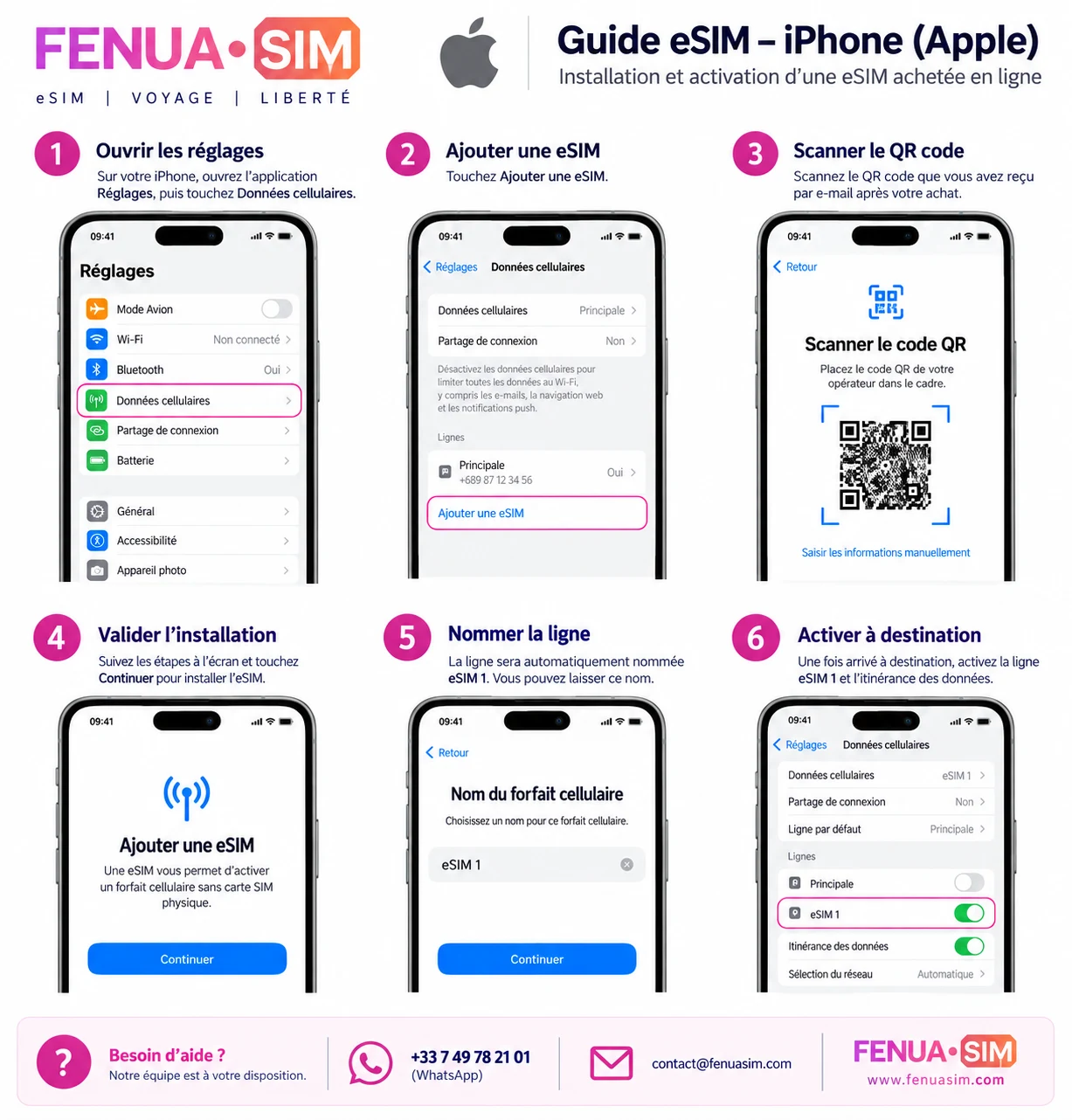
Tap the image to enlarge it
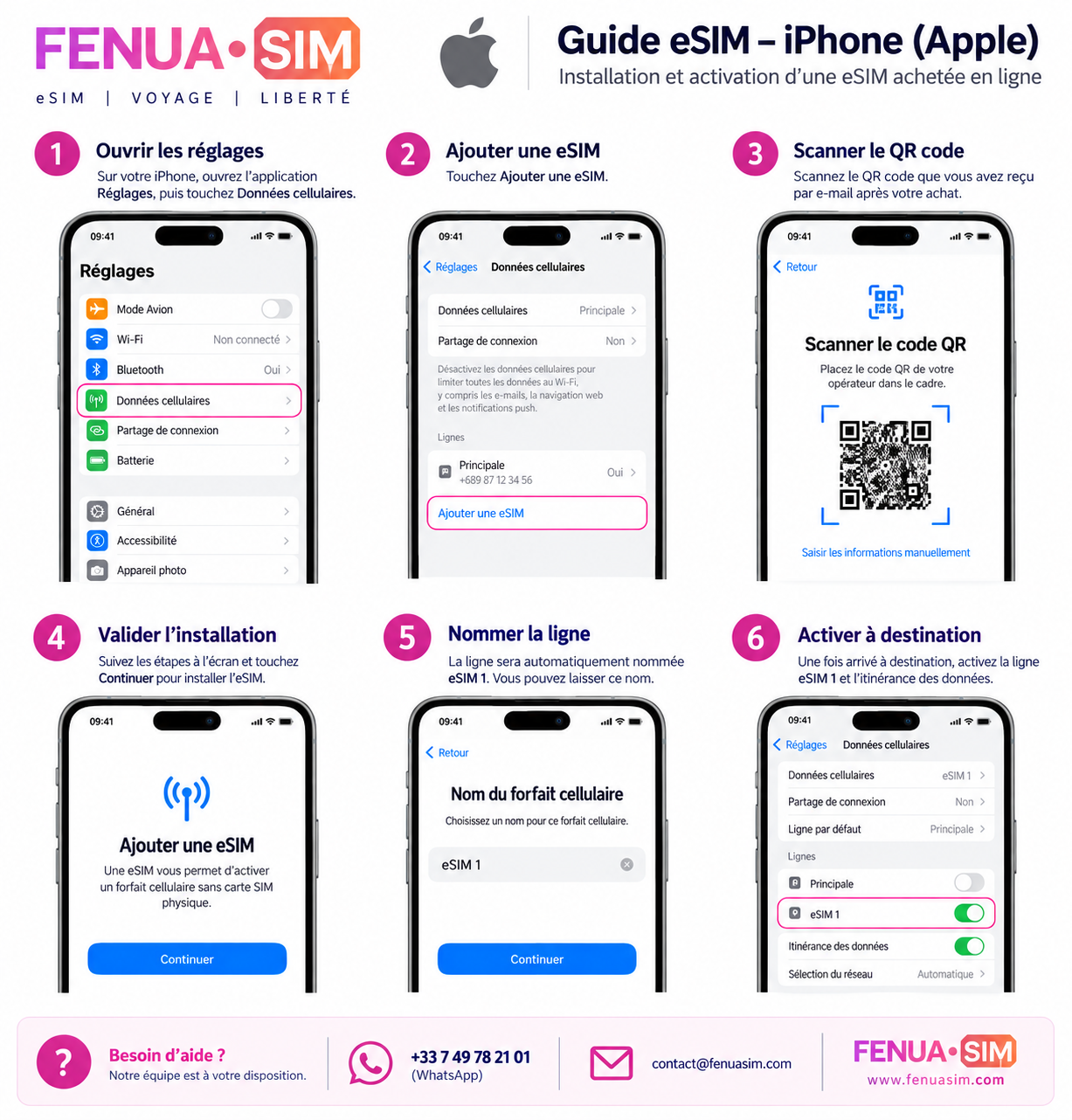
Which phones are compatible?
Dial *#06# in the Phone app: if an “EID” line appears, your device supports eSIM.
iPhone
iPhone XS, XS Max, XR (2018) and every later model
iPhones sold in mainland China have two physical SIM slots and do not support eSIM.
Samsung
Galaxy S20 and later, Galaxy Note 20, Galaxy Z Fold and Z Flip
Some regional variants of the same model ship without eSIM. The *#06# test remains the reliable check.
Google Pixel
Pixel 3 and later
Pixel 3 phones sold in Australia, Japan and Taiwan do not have eSIM. Some Pixels bought from US carriers may be locked.
Other brands
Many recent Motorola, Oppo, Huawei, Honor, Xiaomi and Sony models
Support varies widely from one model and market to another: check with *#06#.
Compatibility may vary depending on the country of purchase and the phone version. If in doubt, the *#06# test is what counts.
Does your phone
support eSIM?
Recommended method
The universal code
Instant result
Check in your settings
Settings → Mobile Data (Cellular)
Look for "Add eSIM"
If the option is there, your iPhone supports eSIM.
Can't see the option?
Try Settings → General → About → Available eSIMs.
Choose your eSIM plan for your destination. Set up in minutes, coverage in more than 200 destinations.
No connection after activation?
Set up your APN
With some carriers, the APN has to be entered manually for mobile data to work. Follow the guide for your phone (PDF guides in French):
APN setup guide — iPhone
Step-by-step PDF guide (in French)
APN setup guide — Android
Step-by-step PDF guide (in French)
Don't know your APN value? Contact our support team with your order number and we will send it to you straight away.
Not sure?
Send a screenshot of your *#06# result to our team. We will quickly confirm compatibility — our team answers in English by email and WhatsApp, 7 days a week.
Ask for a checkEvery message gets a reply from the FENUA SIM team.